Usage
The Halo UI SDK uses Kotlin Coroutines to provide a clean, asynchronous way to launch the UI and wait for a result.
Bringing the SDK Up
Three calls bring the SDK up, and each should be made at the earliest moment it is possible to make it — see The Four Calls.
override fun onCreate(savedInstanceState: Bundle?) {
    super.onCreate(savedInstanceState)
    HaloSdkUi.attach(this, savedInstanceState)  // first line — loads the payment kernel
    val config = haloConfig()
    HaloSdkUi.prepare(config)                   // at your splash — caches branding, warms artwork
    lifecycleScope.launch {
        HaloSdkUi.init(config)                  // once you have a session token
    }
}
| Call | Returns | Notes |
|---|---|---|
attach(activity, savedInstanceState) | Unit | Also wires the Android lifecycle through to the SDK — do not forward onStart/onResume/onPause/onStop yourself. Cheap to call more than once. |
prepare(config) | Unit | Returns immediately; nothing it does can fail in a way you handle. |
init(config) | HaloInitializationResult? | Suspends until the SDK reports its real outcome (registration, attestation, kernel). null means a step failed before the SDK could report at all. Idempotent. Stops early if NFC is switched off. |
Skipping attach or prepare is legal and costs only speed — init does that work as well. The SDK logs a warning if attach runs late.
See Configuration for what each call does, and SDK Version & Device Installation ID for HaloSdkUi.sdkVersion and HaloSdkUi.deviceInstallationId.
Launching a Transaction
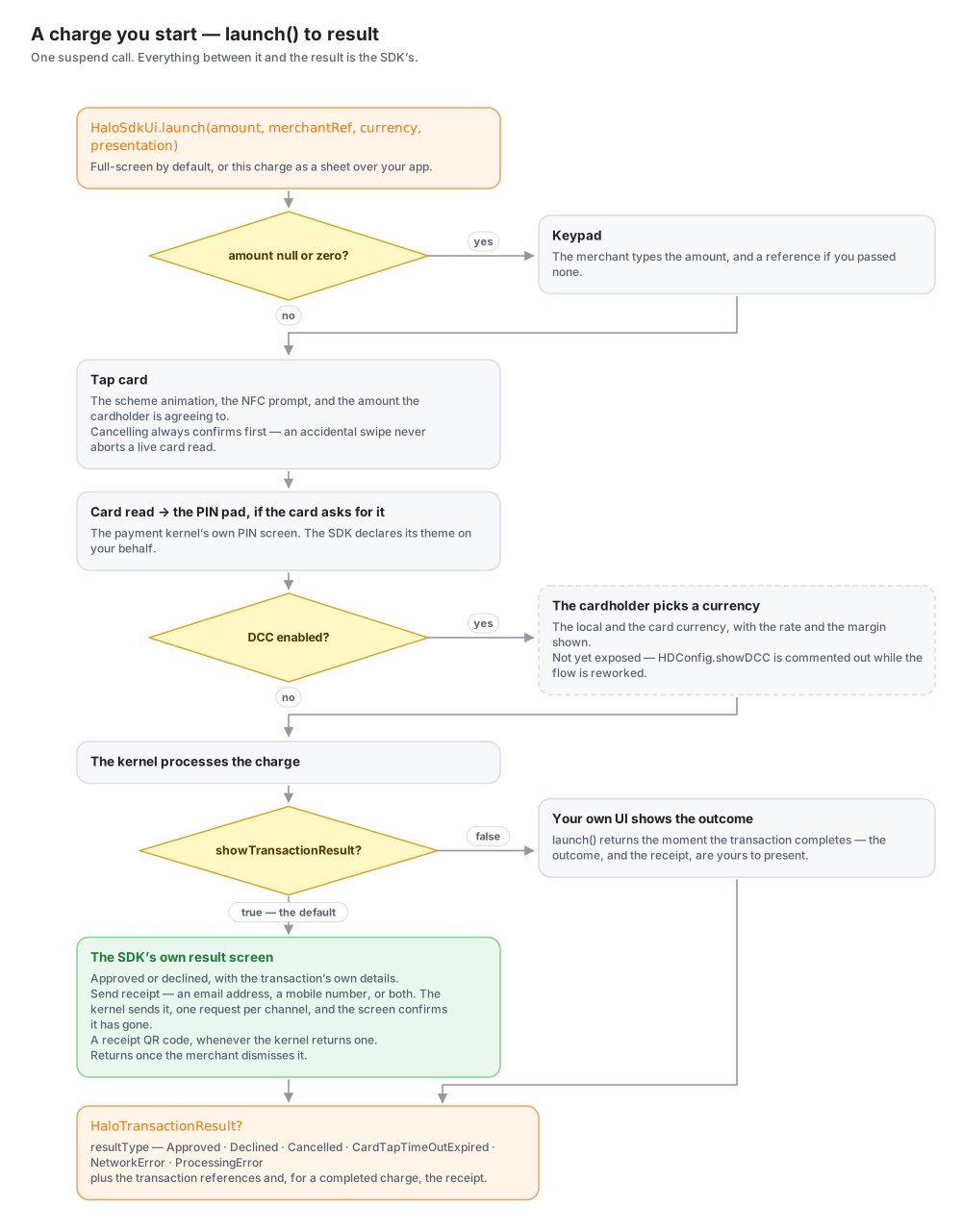
HaloSdkUi.launch is a suspend function that opens the SDK UI and returns when the transaction completes.
Parameters
| Parameter | Type | Default | Description |
|---|---|---|---|
amount | BigDecimal? | - | The transaction amount. If null or zero, the SDK shows a keypad for the user to enter the amount. |
merchantRef | String? | - | Optional merchant reference. Supply one and it is used as-is (and shown read-only on the keypad screen); pass null and the merchant can type one on the keypad. |
currency | HDCurrency? | - | The transaction currency (HDCurrency.ZAR, USD, EUR, or GBP). Omit it and the amount is denominated in the head of your brand file's currencies, which is the rand unless you narrowed the list. |
presentation | HDPresentation | FULL_SCREEN | Whether this charge takes over the screen or appears as a sheet over your app. |
1. Direct Transaction Mode
If the amount is known, the SDK skips the keypad and goes directly to the "Tap Card" screen.
import za.co.synthesis.halo.sdk_ui.HaloSdkUi
import za.co.synthesis.halo.sdk_ui.models.HDCurrency
import java.math.BigDecimal

fun startPayment(amount: BigDecimal) {
    lifecycleScope.launch {
        val result = HaloSdkUi.launch(
            amount = amount,
            merchantRef = "REF-9921",
            currency = HDCurrency.ZAR,
        )
        handleResult(result)
    }
}
2. Manual Amount Entry Mode
If you pass null or zero for the amount, the SDK shows a keypad first where the user can enter the amount (and optionally a reference).
fun openKeypad() {
    lifecycleScope.launch {
        val result = HaloSdkUi.launch(
            amount = null,
            merchantRef = null,
            currency = HDCurrency.ZAR,
        )
        handleResult(result)
    }
}
Presentation per charge
presentation is chosen per launch, not per config, so a host can mix them freely: a quick tap as a sheet over the screen the merchant was on, the next one full-screen, and back again. Nothing is remembered between calls — each launch says what it wants and gets it.
import za.co.synthesis.halo.sdk_ui.models.HDPresentation

val result = HaloSdkUi.launch(
    amount = BigDecimal("125.00"),
    merchantRef = null,
    currency = HDCurrency.ZAR,
    presentation = HDPresentation.SHEET,
)
Inbound payments have no launch call to say, so they use your brand file's presentation key instead — see Presentation.
Handling Results
The launch function returns a HaloTransactionResult? containing a resultType, transaction references, and (for completed transactions) a receipt.
Result Types
Common result types:
| Type | Description |
|---|---|
Approved | Transaction was successful |
Declined | Payment was declined by the bank or issuer |
Cancelled | User closed the SDK before completion |
CardTapTimeOutExpired | Card was not tapped in time |
NetworkError / ProcessingError | A technical error occurred |
Implementation Example
import za.co.synthesis.halo.haloCommonInterface.HaloTransactionResult
import za.co.synthesis.halo.haloCommonInterface.HaloTransactionResultType

fun handleResult(result: HaloTransactionResult?) {
    when (result?.resultType) {
        HaloTransactionResultType.Approved -> {
            println("Approved: ${result.merchantTransactionReference}")
        }
        HaloTransactionResultType.Declined -> {
            println("Declined")
        }
        HaloTransactionResultType.Cancelled -> {
            println("Cancelled by user")
        }
        else -> {
            println("Transaction status: ${result?.resultType}")
        }
    }
}
The Result Screen
By default (showTransactionResult true, or unset) the SDK shows its own result screen before returning, and launch returns once the merchant dismisses it. Set "showTransactionResult": false in your brand file to have launch return as soon as the transaction completes instead, leaving the outcome — and the receipt — to your own UI.
A transaction the user cancelled never shows a result screen: a stop they asked for is not an outcome to report back to them.
When Something Goes Wrong
A technical failure — as opposed to a decline — ends on the SDK's error screen. It shows a plain sentence saying what happened, and under it an Error details line carrying the SDK's own names for the failure.
Those codes are the part worth quoting to support. The payment SDK routinely names one failure twice, once as an error code and once as a result type, and the useful half is not always the same one: a refused charge answers GeneralError plus UnknownError, while a denied camera answers CameraPermissionNotGranted with no error code at all. So the screen leads with whichever name says something and lists all of them underneath — and where the failure is one the merchant can go and fix, it carries the button that fixes it: Open settings for a refused permission, Turn on NFC for the radio. Every other failure offers Close alone, because a button that leads somewhere unrelated to the problem is worse than no button.
Failures that already carry a sentence for the payer, such as an unusable QR code, show that sentence alone with no codes under it.
A decline is not this. It is an ordinary result, it comes back through HaloTransactionResult, and it keeps its Retry button.
When NFC Is Off
Tap-on-phone reads the card over NFC, so the radio being switched off is the one bring-up failure a merchant can fix in two taps — and the one they were least likely to be told about. You do not check for it. The SDK asks the adapter itself, and it asks twice:
| When | What happens |
|---|---|
During init | The bring-up stops before the kernel is asked for anything, and the error screen goes up with Turn on NFC on it. init returns as a failed bring-up. |
At each launch | The transaction is refused before the tap screen is staged. launch answers null, exactly as it does for any flow that ended without a result. |
Both, rather than one: a bring-up that passed proves nothing about the next sale, and the switch is in the merchant's notification shade.
The check runs after your brand file and its language are loaded, so the screen is in your colours and the merchant's words, and after the config is cached — which matters because that cache is the only place the SDK learns which kernel a token-less App Link resolves against. A device that fell out of bring-up before that point would take the next payment link it was sent and fail it on "no kernel is configured", about the wrong problem entirely.
Turn on NFC opens the system NFC page, or the general wireless page on the skins that ship no NFC screen. It starts as a new task, so settings does not become part of your payment flow's back stack: the merchant flips the switch, comes back, and the error screen is still there to close.
Three things it deliberately does not do:
- It does not gate hardware. A device with no NFC adapter at all is yours to gate, not ours — you decide whether your app has any business installing there, and your own "unsupported device" screen says it better than a button to a switch the device hasn't got. Only a radio that exists and is off stops anything here.
- It does not guess. The payment SDK answers
NoTerminalContainerwhen it cannot stand a contactless terminal up, which is what it answers every time with the radio off — and equally what it answers for a genuine container fault on a device whose NFC is on. So the adapter decides which of those you are looking at. A failure the SDK namedNFC…itself is taken at its word. - It does not need host wiring. No callback, no result type to branch on, no permission to request. NFC is a declared permission (see Permissions) and being switched on is not a permission at all — it is the device owner's switch.
Receipts
On an approved transaction, the SDK's result screen offers Send receipt. The merchant enters an email address, a mobile number, or both, and the Halo kernel sends the receipt against the transaction's own reference — one request per channel. The screen confirms once it has gone out.
Delivery is the kernel's, not the device's: there is no Android share chooser in the flow, nothing is pasted into a third-party app, and the backend keeps a record that a receipt was issued. An approved charge can always be receipted, so the button never sits disabled waiting on a lookup.
The result screen also shows a receipt QR code when the kernel returns one, which the cardholder can scan to take the receipt with them. It may never arrive; the screen shows everything else regardless.
Nothing here needs host wiring — it is part of the SDK's own result screens, so it appears whenever showTransactionResult is left true.
Turning It Off
Set "receipt": ["-share"] in your brand file to remove all of it: the button, the sheet behind it, and the QR. This is for a brand that issues receipts somewhere else entirely — its own back office, a printer, the acquirer's portal — and doesn't want a second, unrecorded route out of the payment screen.
It gates the lookup as well as the buttons: with sharing off, the SDK never asks the kernel for receipt/pdf, since nothing is fetched for a screen that would not show it. A decline keeps its retry either way — Retry and Send receipt share the primary slot, and only the receipt face of it goes away. It is in the file with the rest of your brand, so an inbound payment behaves the same way.
receipt also takes true or false to turn every receipt action on or off at once, or an array naming the ones you want — ["share", "print"] adds Print, which shows only where the device has a printer. The default is ["share"].
One Channel Only
To send receipts on one channel only, set "emailReceipt": false or "smsReceipt": false. The sheet then asks for the other alone, and drops the hint that either will do.
Dynamic Currency Conversion (DCC)
The flow is implemented, but nothing public switches it on today: the only setter is a commented-out demo toggle in HaloSdkUi. This section describes the flow it will restore.
When enabled, the SDK offers the cardholder a choice of currency after their card is read:
- A currency-selection screen shows the amount in the local currency and in the card's currency, along with the exchange rate and conversion margin.
- The cardholder picks one and the transaction completes in that currency.
- The success screen then includes the DCC details: local total, exchange rate, margin, transaction currency, and the total transaction amount in the chosen currency.