Push to Terminal
A fourth door, alongside the three in Inbound Payments: a payment sent to a named device. A merchant system calls the kernel's POST /consumer/push naming one of its registered devices, and that device opens on the tap screen with the amount already on it — no QR to show, nothing for the cardholder to scan.
The kernel API — registering devices, pushing a payment, managing the estate — is documented in Push to Terminal (API). This page covers what the SDK UI does on the receiving device, and the one call you make to opt in.
Like the other three doors, this is handled entirely by the SDK. The message arrives at the SDK's own FirebaseMessagingService, becomes a payment URL, and goes to the same activity a payment link goes to — so a pushed payment is charged by exactly the code that charges the rest.
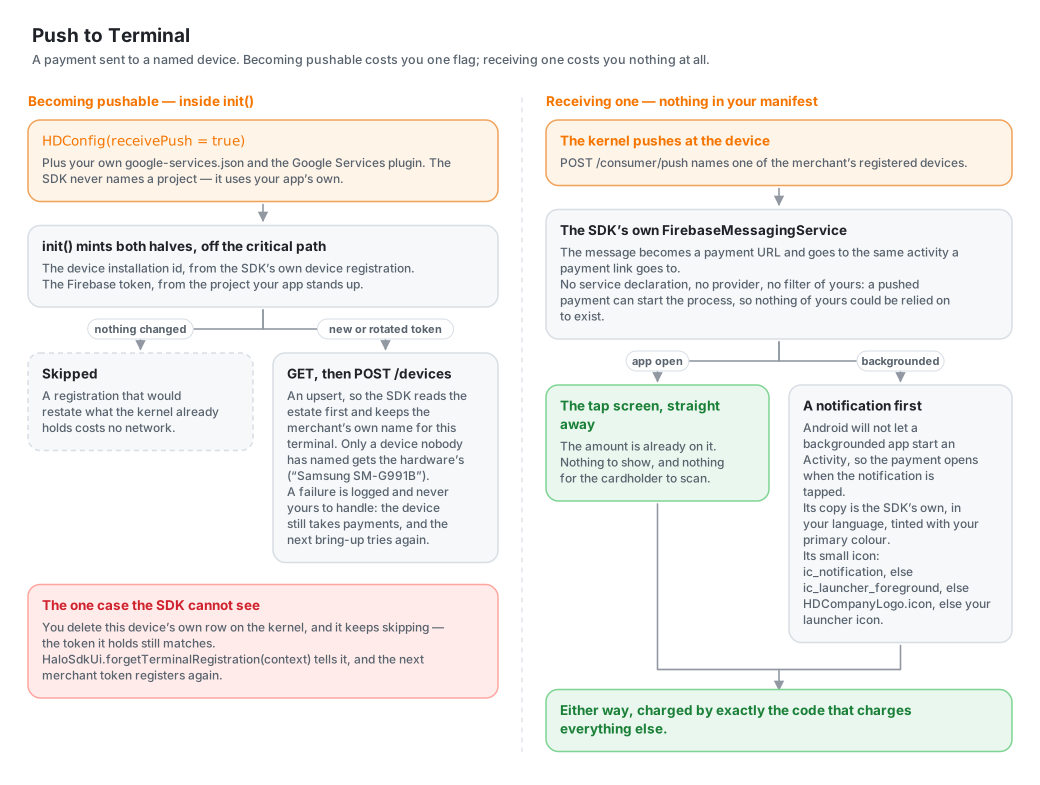
There is nothing to add to your manifest. No service declaration, no provider, no intent filter. The reason matters: a pushed payment can start the process, so there may be no Activity and no host code alive when it lands — anything you would have had to contribute could not be relied on to exist. The one thing you bring is your own Firebase project.
Your Firebase Project
Your google-services.json, in your app module, read by the Google Services Gradle plugin — exactly as any other Firebase app has it:
// app/build.gradle.kts
plugins {
    id("com.google.gms.google-services")
}
Then ask for pushed payments in your brand file:
{ "receivePush": true }
That is the whole of it. The plugin turns the file into google_app_id, google_api_key and project_id string resources; Firebase's own FirebaseInitProvider — which arrives with the firebase-messaging dependency this library already brings, so it is in your merged manifest whether you asked for it or not — reads them at process start, ahead of any service binding. The SDK never names a project: it uses the app's own, the same one your analytics or crash reporting would use.
A host that would rather not add the plugin can write the same three resources by hand, which is all the plugin does:
| Resource | In google-services.json | Why it is needed |
|---|---|---|
google_app_id | client[…].client_info.mobilesdk_app_id — the entry whose package_name is your app's | FirebaseOptions will not build without it |
google_api_key | client[…].api_key[0].current_key | Same |
project_id | project_info.project_id | Firebase Installations, which FCM sits on, will not reach the backend without it |
None of it is secret: every one of these ships in the clear inside any APK built the ordinary way.
This is the same project Telemetry reports into, if you switch that on — the SDK never names a project of its own, in either case.
Leave receivePush false and nothing changes: no token is ever issued, POST /devices is never called, the device is never pushed at, and the app is exactly itself minus the ability to receive. A build with no Firebase project at all reaches the same place with the flag set — there is simply no token to register.
Registering the Device — Nothing to Do
The kernel pushes at a device it holds a Firebase token for, so it has to be told. The SDK tells it, as part of init, off the critical path.
It is the SDK's call rather than yours because it is keyed on two things only the SDK holds: the device installation id, minted inside its own device registration, and the Firebase token, minted against the project it stands up. Handing both out for a host to relay would mean every integrator writing the same POST /devices.
What that buys you: a device becomes pushable by being brought up. There is nothing to call, and nothing to remember.
- The merchant's name for a terminal survives.
POST /devicesis an upsert with a requiredfriendlyName, so the SDK reads the estate first and keeps this device's existing name; only a device nobody has named yet gets the hardware's own name (e.g. "Samsung SM-G991B"). - A rotated token re-registers itself — immediately when there is a session to do it under, and otherwise at the next
init, since the recorded token no longer matches. - The common path costs no network. A registration that would restate what the kernel already holds is skipped.
- A failure is never yours to handle. It is logged; the device still takes payments the ordinary way, and the next bring-up tries again.
If you show the merchant their estate, GET /devices is your call to make, and HaloSdkUi.deviceInstallationId(context) (see Configuration) is what picks out the row for the device in their hand.
If you DELETE /devices/{id} on the kernel for this device's own row, the SDK is still left holding the token it last registered with — which is exactly what the "common path costs no network" check above compares against, so it keeps skipping POST /devices forever. Tell it:
HaloSdkUi.forgetTerminalRegistration(context)
Nothing registers on the spot — the next merchant token the SDK is handed does, the same path every other registration takes. Call this right after a successful delete of this device's row; deleting another terminal's row needs nothing from you.
What the Merchant Sees
With the app open, the payment opens straight away — no tap. Backgrounded, a notification is posted and the payment opens when it is tapped; Android does not let a backgrounded app start an Activity, and a high-priority Firebase message does not change that. The notification's copy comes from the SDK's own translations in the language you configured (see Languages), and it is tinted with your primary colour.
Notification Icon
Android draws a small icon as a silhouette off its alpha channel — only the mark's shape survives, and a mark with no transparent margin fills the badge and reads as a blob however clean its alpha is. So the SDK looks for a drawable your own build already generates, in this order, before it renders anything itself:
ic_notification, if your app declares one — the escape hatch for a host that wants to draw its own.ic_launcher_foreground— the foreground layer of your adaptive launcher icon: your mark on a transparent canvas, already inset to the padding an adaptive icon needs. If your build generates one, this is what a pushed payment's notification uses, with no extra artwork.- Your brand file's
icon, rendered from your SVG on the spot — for a host with neither of the above. - Your launcher icon — last, and only better than nothing: a launcher icon is opaque edge to edge by definition, so silhouetted it is a solid block.
Looked up by resource name, since a library cannot reference your R — nothing to wire if you already generate ic_launcher_foreground.
One loose end is caught on a hook you already call: a message carrying a notification block is drawn by the system, and its tap opens your launcher activity rather than the SDK's — so HaloSdkUi.attach checks the intent it is handed for a pushed payment. Nothing to wire, as long as attach is the first line of your onCreate.
POST_NOTIFICATIONS
Covered in Permissions: it is asked for on Android 13+ only when receivePush is set, since a build that cannot be pushed to has nothing to notify anyone about. Refused, a pushed payment waits for the merchant to next open the app rather than failing.
The shape of the Firebase message the kernel sends is not part of Halo's published Push to Terminal contract, which stops at the POST /consumer/push response. The SDK accepts either plausible shape — a payload carrying the payment link outright (url / link / applink / …), or one naming the payment field by field (transactionId / reference, amount, currency, merchantReference, configJwt) — and logs the keys of anything it cannot read. Watch it with:
adb logcat -s HaloPush