Installation
Follow these steps to integrate the Halo UI SDK into your Android project.
Use the halo_sdk_ui plugin instead of the steps below. It declares this library for you, bridges every call to Dart, and its README covers the two lines of MainActivity code and the Gradle repository a Flutter host still needs. What follows is for a Kotlin host. The brand file and everything under Inbound Payments apply to both.
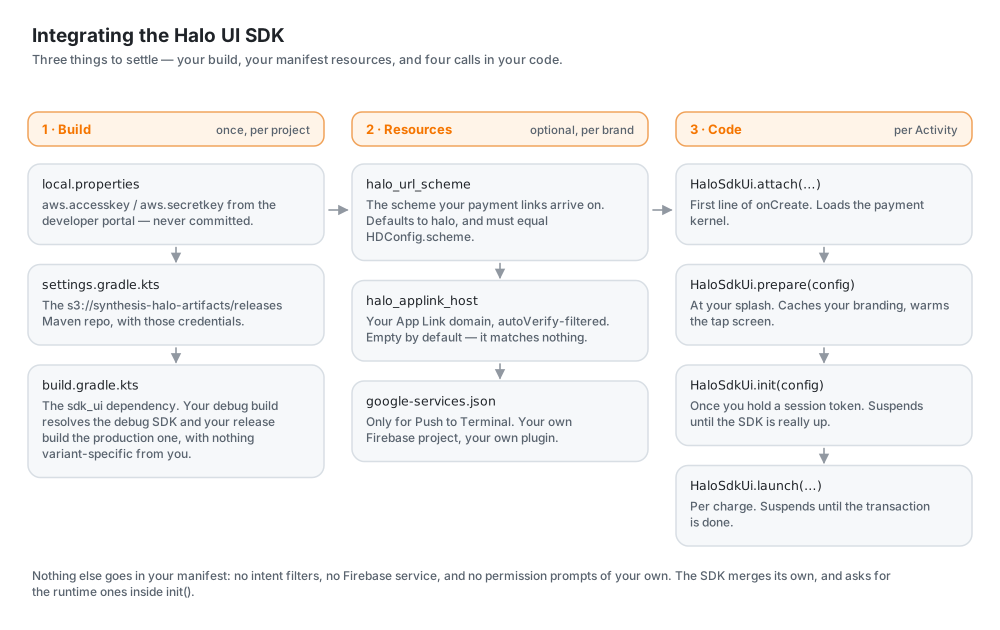
1. Configure Credentials
To access the SDK, you will receive an AWS access key and secret key upon registration on the developer portal. These are sensitive credentials and should not be committed to source control.
Add these to your local.properties file:
aws.accesskey=< PROVIDED IN EMAIL >
aws.secretkey=< PROVIDED IN EMAIL >
Temporary credentials, such as an SSO session's, carry a third value as well. Add it as aws.token, and replace all three when the session expires; S3 answers an expired one with ExpiredToken. CI has no local.properties and exports the same three as AWS_ACCESS_KEY_ID, AWS_SECRET_ACCESS_KEY and AWS_SESSION_TOKEN, which the snippet below falls back to.
2. Configure Repositories
In your settings.gradle.kts (or settings.gradle), load the credentials and configure the S3-hosted Maven repository.
- Kotlin DSL
import java.util.Properties

val localProperties = Properties().apply {
    val localPropertiesFile = rootDir.resolve("local.properties")
    if (localPropertiesFile.exists()) {
        localPropertiesFile.inputStream().use { load(it) }
    }
}

fun haloCredential(property: String, environmentVariable: String): String? =
    localProperties.getProperty(property)?.takeIf { it.isNotBlank() }
        ?: System.getenv(environmentVariable)?.takeIf { it.isNotBlank() }

dependencyResolutionManagement {
    repositories {
        google()
        mavenCentral()
        // Repositories where the Halo UI SDK is hosted
        listOf("releases", "snapshots").forEach { repository ->
            maven {
                name = repository
                url = uri("s3://synthesis-halo-artifacts/$repository")
                credentials(AwsCredentials::class) {
                    accessKey = haloCredential("aws.accesskey", "AWS_ACCESS_KEY_ID")
                    secretKey = haloCredential("aws.secretkey", "AWS_SECRET_ACCESS_KEY")
                    sessionToken = haloCredential("aws.token", "AWS_SESSION_TOKEN")
                }
            }
        }
    }
}
releases holds the published versions and snapshots the candidates. A build that pins a released version never reaches the second.
3. Add Dependency
Add the following to your module's build.gradle.kts:
dependencies {
    implementation("za.co.synthesis.halo:sdk_ui:0.0.37")
}
Replace 0.0.37 with the latest version available.
Both debug and release variants are published under this single coordinate. Gradle selects the right one automatically from its module metadata — your debug build pulls the debug SDK, your release build pulls the production SDK — so you don't declare anything variant-specific.
That pairing follows the build type, and the kernel you talk to is a separate choice. The debug SDK is the one that talks to the sandbox kernel. So a release build meant for sandbox, such as a signed QA build you hand to testers, resolves the production SDK and fails at its first transaction rather than at compile time.
If you ship builds like that, force the debug artifact for them:
val sandbox = true  // however your build knows which kernel it is for

if (sandbox) {
    configurations.all {
        resolutionStrategy.eachDependency {
            val version = requested.version.orEmpty()
            if (requested.group == "za.co.synthesis.halo" && requested.name == "sdk" &&
                version.isNotBlank() && !version.endsWith("-debug")
            ) {
                useVersion("$version-debug")
                because("a sandbox build needs the SDK's debug artifact")
            }
        }
    }
}
Choosing the Payment Kernel
The Halo SDK itself arrives transitively, at whatever version this release was built against, and for almost everybody that is the right answer.
If your acquirer has certified a particular kernel and will not move on your schedule, pin it — a resolution rule rather than a dependency line, because this is usually a downgrade and Gradle resolves a conflict upwards:
configurations.all {
    resolutionStrategy.eachDependency {
        if (requested.group == "za.co.synthesis.halo" && requested.name == "sdk") {
            // Keep the variant that resolved: a debug build asks for "-debug".
            val debug = requested.version.orEmpty().endsWith("-debug")
            useVersion(if (debug) "4.0.20-debug" else "4.0.20")
            because("certified for 4.0.20")
        }
    }
}
Stay within the same major line. The SDK surface this library names is a small one, and it holds still across a major, so an older kernel in the same line is the case this is built for; a different major is a different library and will not compile. Tell us which version you are pinned to — we will confirm this release works against it rather than leaving you to find out at your acquirer's lab.
4. Manifest
Nothing to add. The SDK declares its own activity, the intent filters for inbound payments, the translucent window used by HDPresentation.SHEET, and the payment kernel's PIN pad theme.
🛡️ Permissions
The SDK's permissions are merged into your app's manifest automatically. The runtime permissions among them are requested for you during HaloSdkUi.init() — you don't prompt for anything yourself. The prompt runs alongside the SDK's bring-up rather than in front of it, so a merchant answering it isn't also holding up registration.
| Permission | Runtime prompt | Purpose |
|---|---|---|
INTERNET | — | Network communication with the Halo backend |
NFC | — | Reading payment cards — declared here; switched on is a separate matter |
VIBRATE / MODIFY_AUDIO_SETTINGS | — | Feedback on card tap |
BLUETOOTH / BLUETOOTH_ADMIN | — | External card reader support (pre-Android 12) |
CAMERA | ✓ | Device security verification |
ACCESS_FINE_LOCATION / ACCESS_COARSE_LOCATION | ✓ | Payment compliance (location verification) |
READ_PHONE_STATE | — | Declared by the payment SDK, never prompted for |
RECORD_AUDIO | — | Declared, never prompted for, never needed; the kernel mutes the microphone rather than reading it |
BLUETOOTH_SCAN / BLUETOOTH_CONNECT | — | External card reader support, never prompted for |
POST_NOTIFICATIONS | ✓ (Android 13+, if receivePush) | Push to Terminal's notification, backgrounded |
A denial doesn't abort bring-up — init continues and logs which permissions were refused, and the SDK reports the consequences through its own initialization result.
The two columns are deliberately different. READ_PHONE_STATE cannot do what it is named for on any supported device — Android 10 stopped returning IMEI or serial to a normal app — and asking would cost every merchant a Phone-group prompt that reads as a payment app asking to make calls. Bluetooth is for an external card reader, and there is no reader path in this SDK. Both stay declared, because the payment SDK declares them, and neither is ever prompted for.
RECORD_AUDIO is the one row that buys nothing at all, and is there so a host's store listing reads as it did on v1, which carried it. What the kernel does with the microphone is keep it muted for the length of a transaction, failing the charge with MicrophoneWasUnmuted if that lifts; it links no audio-input library and cannot open a microphone. A held grant would sit against that countermeasure rather than enable anything, which is why it is only ever declared. The same goes for the microphone, camera.any and bluetooth_le feature declarations beside it: all three are optional, so none of them filters a device off your listing.
POST_NOTIFICATIONS is asked for on Android 13+ only when receivePush is set — a build that cannot be pushed to has nothing to notify anyone about. Refused, a pushed payment waits for the merchant to next open the app rather than failing; nothing else about Push to Terminal is affected.
Using the Camera in Your Own App
The payment kernel watches the camera while it is up: it reads entropy off it, and treats another component opening it as tampering, which cancels a card read in progress. If your app uses the camera too — a QR scanner, say — tell the kernel:
HaloSDK.requestCameraUsage()   // before the camera is opened
HaloSDK.returnCameraUsage()    // once it is closed
stop() on a CameraX controller returns when the release begins. Closing the capture graph and then the device runs about two seconds on the hardware we have measured — hand the camera back before that and the kernel finds it still open and reports your own scanner as tampering. The SDK holds itself to the same rule: monitoring stands down for the length of a boot, where there is no card read to protect, and comes back up with the tap flow.
The PIN Pad Theme
The SDK also declares a theme for the payment SDK's PIN pad activity (PinScreenLauncherActivity) on your behalf. Without it, a host whose application theme is not AppCompat — a Flutter host, typically — crashes the moment the kernel asks for a PIN, with the card already read. There is nothing to do; it is mentioned only so the extra <activity> in your merged manifest is not a mystery.
🏗️ Build Configuration
Two things have to be settled in your app's build rather than in your brand file, because both live in the manifest — read before any of your code runs, so no runtime file could set them.
| Resource | Default | What it does |
|---|---|---|
halo_url_scheme | halo | The custom scheme payment links arrive on — halo://pay?… |
halo_applink_host | (empty) | Your App Link domain, as an autoVerify filter for http and https |
Both ship as string resources the SDK's payment activity points its filters at. Override them and the filters are yours; ignore them and you get halo:// plus an App Link filter that matches nothing — exactly what a brand with no links of its own gets by default. Neither is mandatory.
// app/build.gradle.kts
android {
    buildFeatures { resValues = true }
    defaultConfig {
        resValue("string", "halo_url_scheme", "yourbrand")
        resValue("string", "halo_applink_host", "pay.yourbrand.com")
    }
}
Or declare the same names in res/values/strings.xml — app resources win over a library's either way.
Two apps claiming halo:// on the same device is a chooser the payer should never see. If you override halo_url_scheme, put the same value in your brand file's scheme key so the parser knows which scheme is yours — the resource is the manifest half and the file's is the parser's half, and they have to agree.
autoVerify on the App Link filter needs an assetlinks.json published on that domain; without it Android offers a chooser instead of opening your app directly. See Inbound Payments for how these links are handled once they arrive.