Inbound Payments
Besides charges you start with HaloSdkUi.launch, the SDK can be opened by a payment that arrives from outside your app — another app handing over a transaction, a halo:// link, an App Link, or a scanned QR code.
These are handled entirely by the SDK. Its own activity owns the intent filters, restores the branding and language cached by HaloSdkUi.prepare, brings the SDK up, and drives the transaction. No host code runs, and on a Flutter host no Flutter engine is started.
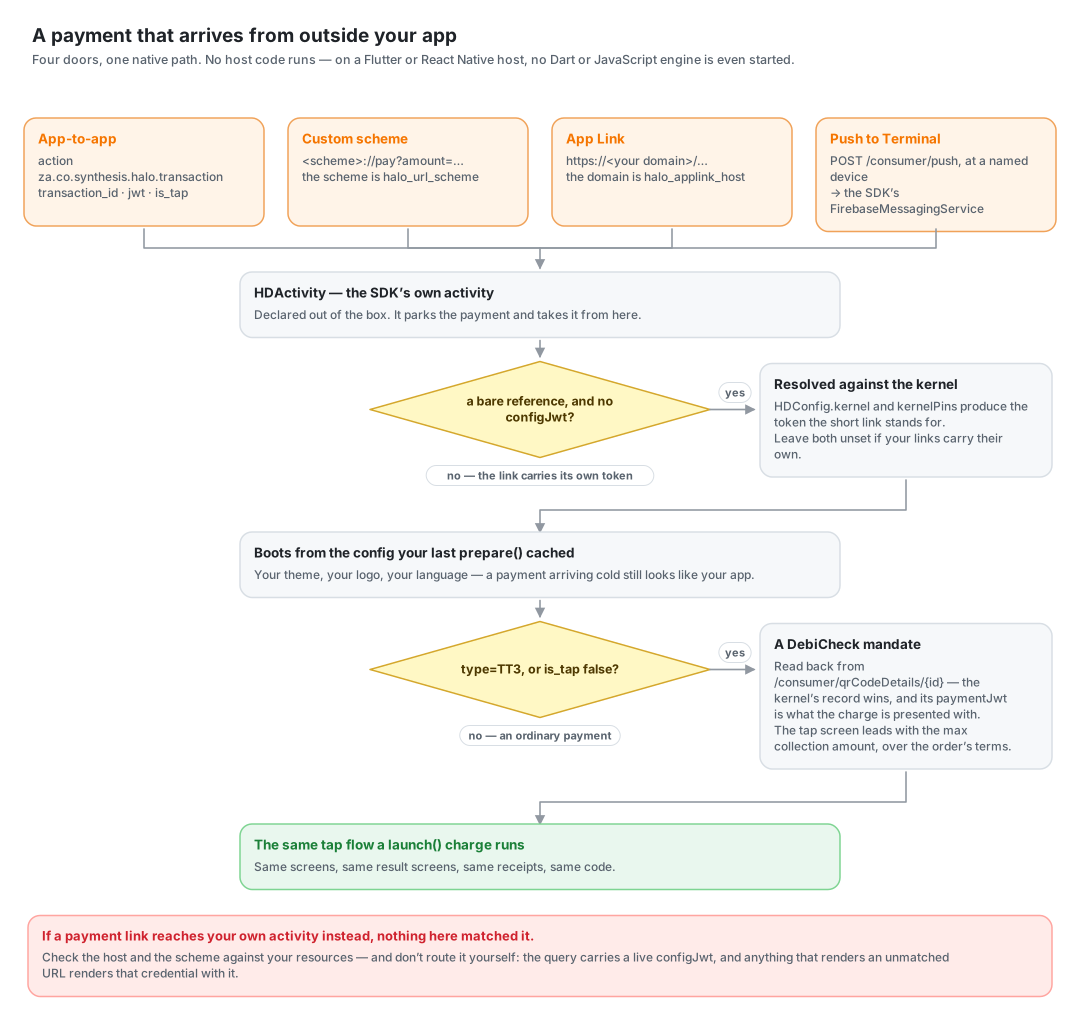
Because an inbound payment can arrive on a cold start, the appearance it paints itself with is the one cached by prepare. A host that never calls prepare gets Halo defaults on that path.
The Three Doors
| Door | Shape | What identifies it |
|---|---|---|
| App-to-app | Intent with transaction_id + jwt extras | Action za.co.synthesis.halo.transaction |
| Custom scheme | halo://pay?amount=…¤cy=…&merchantReference=… | Your scheme — see Build Configuration |
| App Link | https://<your-domain>/… | Your App Link host — see Build Configuration |
A URL comes in two shapes. The long form describes the payment outright — …?id=…&amount=…&configJwt=eyJ… — and the SDK has everything it needs from the URL alone. The short form is a pointer — https://<domain>/<reference> with nothing chargeable in the query — standing for a payment held server-side, which the SDK resolves against the Halo kernel before it brings itself up.
Query parameters accept both spellings a link may carry: merchantReference or reference, transactionId / id / uuid, and configJwt or jwt.
The old halompos.page.link filter is gone. FDL was shut down in August 2025, nothing in the SDK resolves a short link into its payment payload, and a bare page.link URL carries no query to read — so the filter only ever offered the app in a chooser for a link it could not act on.
Setup
Your URL scheme and App Link domain are set at build time, since both live in the manifest — read before any of your code runs, so no config call could set them. See Build Configuration for halo_url_scheme and halo_applink_host.
One more thing is set, in your brand file:
Short App Links
A short App Link carries no configJwt, and resolving it is what produces the token — so there is no credential to take the kernel's address from, and the brand file has to say which kernel to ask:
{
  "kernel": "kernelserver.go.qa.haloplus.io",
  "kernelPins": "sha256/CNOtjib4NAlSqDZDY5aknDcVbcfLEWBgnGl/dgec4aA="
}
kernel is the address this client calls: https:// is optional and a trailing slash is trimmed, and a path prefix is kept, so a deployment served under one (qa.example.co.za/kernelserver) states it. kernelPins are SHA-256 SPKI fingerprints as sha256/<base64>, the same values a token's aud_fingerprints claim carries; bare base64 is accepted too, and several are separated by ; or ,. More than one is normal, so a certificate rotation cannot brick the SDK, and naming none resolves the link unpinned, which is logged.
Leave both out if your links carry their own JWT. Every other call reads its kernel, and its pins, off the credential it presents.
If a payment link reaches your own app's activity instead of the SDK's, nothing here matched it — check the host and scheme against the table above rather than routing it by hand. The query carries a live configJwt, and anything that renders an unmatched URL renders that credential along with it.
Presentation
An inbound payment arrives with no launch call to say how it wants to be presented, so it uses your brand file's presentation key. A brand that presents its own charges as a sheet should set it, so a payment looks the same however it arrived.
DebiCheck Mandates
A DebiCheck mandate — the scheme's TT3 — is a debit order the payer authorises by tapping their card, rather than a payment. It arrives through the doors above and needs nothing extra from you: the SDK recognises it, runs the same tap flow, and charges it with the kernel's TT3 call.
| Entry point | How it says it is a mandate | Fields |
|---|---|---|
| App-to-app | is_tap extra set to false | accountNumber, pid, maxCollectionAmount, contractReference, collectionDay, creditorABSN |
| URL / App Link | type=TT3 in the query | The same names, except the identity number is id and the transaction is uuid |
creditorABSN is the creditor's Abbreviated Short Name — the trading name that appears on the payer's bank statement — and it renders as the "Description" row. collectionDay is the day of the month the order runs. Both fall back to undefined when omitted, as v1 does. accountNumber and the identity number are required: a mandate without them is rejected rather than charged blank.
Whatever the intent or link carries, a mandate with a transaction id is always read back from the kernel before it is charged: the account and identity number it is registered against are the kernel's, and the charge is presented with that record's paymentJwt rather than the link's own token.
What the payer sees. The tap screen leads with the instalment amount — the mandate's max collection amount: the ceiling the debit order may collect up to, not a sum being taken now, and also what the kernel authorises against and what the PIN pad shows. Under it sit the four things that identify the order: the collection day, the account it will be collected from, the creditor's description and the contract reference — so the payer can recognise what they are agreeing to. A mandate is a document being agreed to rather than a price being paid, so those sit in a card together; once the card has been read the terms collapse away and the amount stays. The DebiCheck mark is shown alongside the accepted-scheme marks.
An approved mandate reports Mandate Approved with those same terms in place of the card, scheme and authorisation rows: nothing has been collected yet, so there is no card receipt to show.
The Fourth Door
A payment sent to a named device — no link, no QR, nothing for the payer to scan — arrives through a different door entirely: see Push to Terminal.