Introduction
Add a dependency, make four calls, and your app can take a card payment. The Halo UI SDK owns everything in between: amount entry, the card-reading screens, the PIN pad, the result screen and the receipt. It is built with Jetpack Compose and designed to be driven from a Flutter or React Native host just as easily as from Kotlin.
🚀 What You Get
- The whole payment UI. Amount entry, card-reading animation, PIN, success and failure screens.
- Your branding. Light and dark colour schemes, a ramp of up to four colours, corner radius, type sizes and your own logo, stated once as a file in your build — see Theming. Tell the SDK which mode your app is showing and the payment screens match it.
- Digital receipts. The Halo kernel emails or texts the cardholder's receipt against the transaction's own reference — see Receipts.
- Payments that arrive from outside. App-to-app intents, payment links and pushed payments are handled natively by the SDK, with no host code involved — see Inbound Payments.
- DebiCheck mandates. A TT3 debit-order mandate arrives through the same doors and runs the same tap flow — see DebiCheck Mandates.
- Seven languages, following the device by default, narrowable to the ones your app speaks, and every string overridable per brand — see Languages. Tell the SDK what your own language picker chose and the payment screens follow it.
- Cross-runtime friendly. A brand stated as a file and a suspending token callback, so a Flutter or React Native host bridges four values, not a config object.
- Optional telemetry. Off by default. Switched on, the SDK reports its own operations and crashes into your Firebase project and never anything about the payment — see Telemetry.
Dynamic Currency Conversion is implemented but not yet switchable: nothing public sets it while the flow is reworked. See DCC.
📋 Requirements
- Android 10 (API 29) or higher
- A Halo SDK token, issued by Synthesis/Halo
- A
ComponentActivity(or a subclass such asAppCompatActivity) to host the SDK
The Four Calls, and the Two Setters
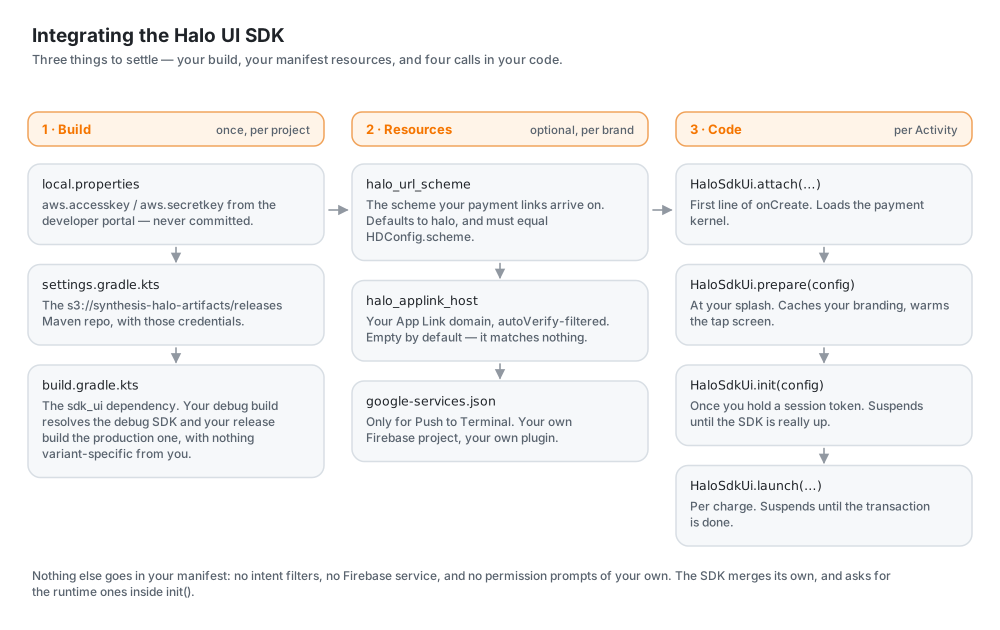
| Call | Where | Blocking? | What it does |
|---|---|---|---|
attach(activity, savedInstanceState) | First line of onCreate | No | Loads the payment kernel, overlay protection and entropy, and wires the Android lifecycle through. |
prepare(config) | Your splash screen | No | Reads your brand file, loads its language, and warms the tap screen's artwork. |
init(config) | As soon as you hold a session token | Suspends | Registers the device, requests runtime permissions, and brings the SDK up. Returns the real outcome. Stops early on NFC switched off. |
launch(amount, ref, currency, presentation) | Per charge | Suspends | Runs the transaction and returns the result. Refuses on NFC switched off. |
setLanguage(context, language) | Wherever your app resolves its own | No | Records the language your app is speaking, so the payment screens speak it too. Optional — see Following Your App. |
setThemeMode(context, mode) | Wherever your app resolves its own | No | Records whether your app is light, dark or following the device, so the payment screens match it. Optional — see Following Your App's Theme. |
The two setters are the odd rows out: no order, no pairing, and nothing breaks without them. The four above are the integration.
The order is the point. Each call needs strictly more than the one before it — an Activity, then your config, then a token — so each runs the moment that thing exists and the work spreads across your startup instead of piling up in front of a merchant holding a card. Skipping any of the first three is legal and costs only speed, because the next call does that work too.
attach also wires the Android lifecycle through to the SDK, so you never forward onStart/onResume/onPause/onStop yourself. The SDK logs a warning if it ran late — it must be the first line of onCreate, not your splash, not after your own setup.
Example Activity Declaration
import android.os.Bundle
import androidx.activity.ComponentActivity
import androidx.lifecycle.lifecycleScope
import kotlinx.coroutines.launch
import za.co.synthesis.halo.sdk_ui.HaloSdkUi
import za.co.synthesis.halo.sdk_ui.models.HDConfig

class MainActivity : ComponentActivity() {
    override fun onCreate(savedInstanceState: Bundle?) {
        super.onCreate(savedInstanceState)

        // 1. First line. Loads the payment kernel. Needs nothing from you.
        HaloSdkUi.attach(this, savedInstanceState)

        val config = HDConfig(
            activity = this,
            onTokenRequest = {
                // Return your Halo SDK token. This is a suspend context, so a
                // network call to your backend needs no extra plumbing.
                "YOUR_SDK_TOKEN"
            },
        )

        // 2. At your splash. Loads your brand file and warms the artwork.
        //    Returns immediately.
        HaloSdkUi.prepare(config)

        // 3. As soon as you have a session token, usually right after login.
        lifecycleScope.launch {
            val result = HaloSdkUi.init(config)
            // result?.resultType / result?.errorCode carry why, if bring-up failed.
        }

        // ... set your own content
    }
}
That is all the code. The other half of an integration is one file, src/main/assets/halo/brand.json, which is what makes those screens yours rather than Halo's:
{
  "light": { "primary": "#FF6200EE" },
  "logo": "brand-logo.svg"
}
Every key is optional and there is nothing to call — see Theming. HDConfig itself carries only the two things a file genuinely cannot state: the live [activity] and your [onTokenRequest] bridge.
prepare and init must be given the same HDConfig. It only carries the live wiring now — the brand file supplies everything else, and it is read the same way whichever call needs it.